
SEO Platforms for Education: Campus-Web Audits and Remediation
Choosing the best platform for SEO for education starts with the website jobs your institution actually has to do. The AI visibility audit guide shows how to set a baseline of observed evidence, and this guide applies the same discipline to technical campus-web work. SEO platforms for education are tools used to research, audit and remediate an institution's website estate, and a technical finding, a program fact and an enrollment event are three different kinds of evidence.
This guide is for campus web and SEO operations teams selecting technical audit, ownership and remediation tooling across an education site estate. It is written by the Prime AI Editorial Team, and Prime AI Visibility and Percepture are commercially connected. It does not rank vendors or promise a result. Program eligibility, deadlines and student-question accuracy belong to a separate guide, and the technical web operations covered here are the crawl, the owner and the accepted fix.
"A useful platform should help the right owner fix the right page and show what was checked." Editorial commentary from the Prime AI Editorial Team
In this guide:
- Inventory the campus-web responsibility
- Compare jobs before comparing platforms
- Use one crawl-to-fix acceptance record
- Evaluate access, scope and export
- Keep program evidence separate from technical evidence
- Run an authorized representative check
- SEO platforms for education: the crawl-to-remediation record
Inventory the campus-web responsibility
Begin with facts about your own estate. List the domains and subdomains, the departments that publish to them, the content management systems in use, who owns each section and which journeys matter most, such as a program page, an application page or an event page. A large estate with many publishers needs an accountable remediation process more than it needs a single all-in-one score.
Write down who can change what. A web operations team may be able to fix a template but not a departmental page, and a departmental editor may be able to fix a page but not its navigation. A finding is only useful if it reaches a person who can act on it.
Decide where Prime AI Visibility answer evidence fits alongside your technical exports, so that a question about how an answer describes a program is not mixed into a crawl backlog. Name the evidence you already hold. Existing crawl exports, analytics, the content management system's page records and the release process all shape what a new tool must add. Do not buy a platform to produce a report that nobody is assigned to read.
Compare jobs before comparing platforms
Five jobs are often bundled under one product name, and they are not interchangeable.
| Job | What it produces | What it does not prove |
|---|---|---|
| Query research | Candidate topics and reported search metrics | That a page answers the question well |
| Technical crawl and issue tracking | Flagged URLs, statuses and tasks | That a flagged URL is a student-facing defect |
| Content review | Page quality and consistency observations | That the content is factually correct |
| Accessibility and governance | Issues routed to owners | Compliance or certification |
| AI-answer observation | What a sampled answer displayed, with sources | Why it appeared, or any crawl finding |
Public vendor pages show how these categories are framed. Silktide's governance page describes a site-quality and governance workflow that turns issues into tasks, and Siteimprove describes campus-web quality and SEO analytics scope for higher education on its own pages. Both are vendor-published descriptions. Licensing, site coverage, data permissions and workflows still need verification during procurement, and a screenshot score, a review rating or a compliance label is not an institutional result.
Prime AI Visibility belongs to the last row. As its features describe, it saves sampled answers to chosen questions with their displayed sources and supports reviewed content planning. It is not a campus crawler or an accessibility-certification tool, and it does not replace one.
Google's own guidance on AI features and your website is the primary source for how site owners are described as relating to those features, so check it directly before relying on any vendor's summary of it.
Use one crawl-to-fix acceptance record
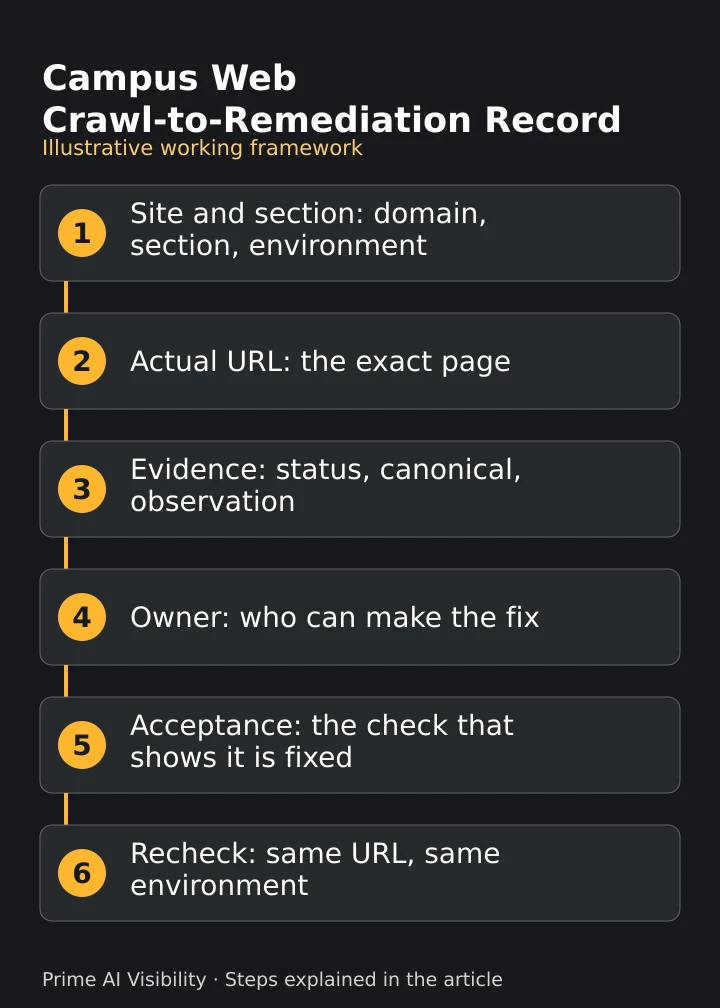
The core of the work is a single record that follows an issue from flag to verified fix. For each issue, record the affected URL and section, the observed issue and its source, the responsible owner, the reason for its priority, the approved fix and the evidence that will show it is resolved.
A crawl flag is not proof of a defect that students see. Inspect the page first, in the environment that matters, and record what you actually observed: the status, the canonical and the rendered content. A flagged URL that redirects correctly or sits behind a staging path is a finding to close, not a fix to schedule.
Assign each fix to the person who can make it. The AI evidence in content and CRM workflows guide describes a human handoff without assuming any integration, and the same rule applies when a finding moves from web operations to a departmental editor. Where a fix changes page content, route it through the AI SEO content production workflow guide so that a sourced change is reviewed before it ships.
Close an issue only on acceptance evidence. A later check of the same URL, in the same environment, that shows the change is better than a status that someone set to done.
Evaluate access, scope and export
Ask each vendor the questions its public pages do not answer. How many sites and subdomains can one licence cover? Who can see which sections? How long is data kept? How are issues routed to owners, and can the evidence be exported with the record? Treat unsupported integrations and coverage as procurement questions, not as checked boxes.
Check the cost responsibility. Licences for an institution often sit with a different budget from the team that uses the tool, and the AEO budget ownership guide routes that question to its existing owner.
Test permissions before you buy. A tool that can crawl a staging environment is not the same as one that can crawl a protected section, and a tool that can export a report is not the same as one that keeps a history you can inspect later. If a vendor cannot show you how a finding is retained, assume you will have to keep the record yourself.
Ask for a trial on a representative section instead of the vendor's sample site, and keep the trial settings with your notes. Compare like with like. A crawl run on a different date, scope or setting will flag different issues, so note the environment and settings with every export.
Keep program evidence separate from technical evidence
Program eligibility, deadlines and course facts need the responsible academic or enrollment owner. A technical tool cannot confirm that a deadline is correct, and an AI answer that states a wrong deadline is a source problem for that owner, not a crawl finding. The guide to checking AI brand-claim accuracy describes how to trace a claim to its source and its correction owner.
The questions prospective students ask are a separate research job. The guide to prompt intent classifies those questions, and a technical platform does not replace it. Do not use a technical score to claim that enrollment improved.
Keep the measures apart. As the AI visibility metric definitions describe for the answer side, a brand named, a website cited and a source link are different observations, and none is a visit, an application or an enrolled student. Take accepted inquiries and applications from your own systems.
Run an authorized representative check
Before you commit, test a tool on something you control. Propose a public or synthetic page with a known defect, such as a broken link or a stale date, and assign it an owner. Run the candidate tool, record what it actually reports and note whether it routes the issue to the right person.
Record only what you observed in a real test. A planned check is not a result, and a vendor demonstration on the vendor's own site does not show how the tool behaves on yours. Validate mobile and accessibility-related fixes through the institution's existing release process and with qualified reviewers, because a tool score does not establish compliance.
After the fix, retest the same URL. The guide to historical AI-search data platforms leaves tool selection for comparing answers across dates with its existing owner, and the broader AI visibility strategy guide keeps the wider planning loop in its own place. If an AI answer describes the page differently after the change, record the date and do not credit one to the other. When Prime AI Visibility answers change between checks, note whether the underlying source changed first.
For help with a public discovery gap, Percepture offers generative engine optimization services, and the broader Percepture agency covers integrated marketing. Its Digital PR services describe the earned-source service without promising coverage. For supplier diligence, its comparison of SEO professionals and its comparison of SEO experts in education are editorial comparisons, not proof of superiority.
SEO platforms for education: the crawl-to-remediation record
The record below ties each issue to its evidence, its owner and its acceptance test. It is a proposed application, not a validated scoring model, a completed client engagement or a proprietary study. Copy the first two columns as a blank worksheet, and treat the third as one illustrative example.
| Record field | What to enter | Illustrative entry |
|---|---|---|
| Site and section | The domain, section and environment | A departmental section on the main site |
| Actual URL | The exact page address | One page with a stale navigation link |
| Observed issue and evidence | What you saw, with status and canonical | A link that no longer reaches its target, confirmed by inspection |
| Owner | One named person who can make the fix | The web operations lead assigns the departmental editor |
| Priority and impact | The reason, in a sentence | On a path students use to reach a program page |
| Proposed fix | The approved change | Update the link to the current page |
| Acceptance evidence | The check that shows it is fixed | A later link check of the same URL |
| Recheck | When and how it is tested again | After the next release |
In the example, a departmental page has a stale navigation link. Web operations verifies it, assigns the owner and records a real later link check. The example does not claim a crawl was run, compliance achieved or enrollment improved, and it contains no figures.
State who uses the record and what they supply. Web operations keeps it, the departmental owner supplies the fix and the release owner accepts it. Keep the exports and screenshots with the record, review it at each release and at a fixed interval otherwise, and write "unknown" in any field you cannot fill. A missing owner is a reason to hold the issue, not to assign it to whoever is nearest.
Frequently asked questions
Is AI-answer monitoring a campus technical crawler?
No. Evaluate each tool's documented role separately.
Does a platform score certify accessibility or compliance?
No certification was established. Expert review and your institution's own requirements remain necessary.
How is this different from a program-facts guide?
This guide covers technical web operations and remediation. Program facts and student-question evidence belong to the program owner and a separate guide.
Can a technical score show that enrollment improved?
No. Take applications and enrollment from your own systems, and keep them separate from crawl findings.
Next steps
- Pick one section. Choose a representative campus section and a redacted issue.
- Fill in the first record row. Use the worksheet above, and mark every unknown.
- Add answer evidence. Save the answers in Prime AI Visibility with their displayed sources and recheck after an approved change.
References
- Silktide, Governance, a vendor-published description of a site-quality and governance workflow.
- Google Search Central, AI features and your website, primary guidance for site owners.
Add answer evidence to your technical work
Create a workspace to save answers to the questions people ask about your institution, keep the displayed sources and compare the same questions after an approved page change. Coverage, cadence and credits depend on the plan, and paid plans add Gemini and an AI Overview-style preview built from Google-grounded answers. Answers vary, so a recheck shows what was displayed, not why.