
Monitor GPTBot Crawler Activity: Logs, Access Controls and Visibility Limits

To monitor ai crawler activity gptbot requests reliably, you need server or CDN logs, a verified source address and a record of what your site returned, not a dashboard count. Prime AI Visibility does not collect server logs; it saves answers to selected buyer questions, so it covers the separate question of what an assistant displayed.
To monitor ai crawler activity gptbot means reading your own request logs, confirming that a request labeled GPTBot really came from OpenAI's published ranges, and recording the path, status and cache outcome of each verified request. It tells you what reached your pages, not what an answer showed.
This guide helps technical SEO specialists, developers, CDN and security operators and content owners. The outcome is a repeatable ledger you can build from existing logs, a safe way to find access failures and a clear line between crawl evidence and visibility evidence.
“A crawler visit tells us what reached the page. It does not tell us what a buyer saw or why they contacted us.” Bob Generale, editorial commentary
In this guide:
- The short method for reading GPTBot requests
- What GPTBot, OAI-SearchBot and ChatGPT-User each do
- Which log fields to collect at the edge and origin
- How to verify identity before counting
- The Purpose–Identity–Route–Outcome Ledger with a synthetic example
- How to diagnose real access failures
- How crawler evidence connects to saved answers
- FAQs and next steps
How do you monitor AI crawler activity GPTBot sends to your site?
To monitor ai crawler activity gptbot sends, pull request logs for one fixed window, keep only requests whose user agent claims an OpenAI bot, verify the source address against the operator's current published ranges, then group the verified requests by path and status. Treat everything else as unverified traffic.
Five checks make that dependable:
- Use raw logs. A dashboard's activity index or small rolling buffer can hide requests, so keep the underlying records.
- Cover edge and origin. A CDN can answer a request from cache or block it before your origin sees it.
- Verify identity. A user agent is a label any client can send.
- Read the outcome. A request that received a redirect, a block or an error is a different finding from a 200 response with readable HTML.
- Keep it descriptive. A crawl is an observation about your server. It is not a citation, a referral or a lead.
A short window with no GPTBot requests is also not proof your site was never crawled. It may reflect where logs are collected, how long you retain them or whether requests were answered at the edge.
Do GPTBot, OAI-SearchBot and ChatGPT-User do different jobs?
Yes. OpenAI's crawler documentation describes separate user agents with separate purposes, and site owners can set them independently. The table summarizes what that page says as read in November 2026. OpenAI can change the list, so check the page when you build rules.
| User agent | Documented purpose | What it means for monitoring |
|---|---|---|
| GPTBot | Crawls content that may be used in training generative AI foundation models | Disallowing it signals that content should not be used for training; it says nothing about search answers |
| OAI-SearchBot | Surfaces websites in ChatGPT's search features | Opting out means a site is not shown in ChatGPT search answers, though it can still appear as a navigational link |
| ChatGPT-User | Visits a page for certain user actions in ChatGPT and Custom GPTs | Initiated by a user, so robots.txt rules may not apply; not used to decide search inclusion |
The same page lists OAI-AdsBot, which checks the safety of pages submitted as ads, and notes that when both GPTBot and OAI-SearchBot are allowed, results from one crawl may serve both uses. OpenAI also says search systems can take roughly a day to adjust after a robots.txt change.
Operator documentation is the source for each bot's purpose. Cloudflare's AI Crawl Control bot reference groups the same three as an AI crawler, an AI search bot and an AI assistant, which is a useful reporting taxonomy. Pick one taxonomy and keep it fixed so month-to-month comparisons stay valid.
Which fields should you collect at the edge and origin?
Collect the same fields in both places so the two logs can be compared. Edge logs show what the CDN received and decided. Origin logs show only what was passed through.
| Field | Why it matters | Handling note |
|---|---|---|
| Timestamp and timezone | Aligns edge and origin windows | Store in UTC and record the source's timezone |
| User agent | Records the claimed bot | Treat as a claim, not an identity |
| Source IP | Enables range verification | Apply your privacy and retention rules |
| Method and path | Shows which route was requested | Redact tokens and personal data in query strings |
| Status code | Shows the outcome | Keep redirect targets where available |
| Bytes and cache outcome | Shows what was served and from where | Record HIT, MISS or bypass as your CDN names them |
Two cautions apply. First, redact query strings that can carry session tokens, email addresses or campaign identifiers before logs are shared or analyzed. Second, record coverage honestly: write down which hosts, edges and time zones each log source includes, because a count from a partial source is not a site total.
How do you verify identity before counting requests?
Match the connecting IP address with the operator's current published ranges. OpenAI documents a published address list for each user agent, in files named after the bot. Download the current list when you run the analysis, because ranges change.
Use a maintained CIDR-aware library or your CDN's verified-bot signal. A string comparison against an address is not enough, since the published entries are address blocks. Where you rely on a CDN's verified-bot classification, record that it is the CDN's classification and keep the raw address for audit.
Give each request one of three states:
- Verified: the address falls in a current published range for the claimed bot.
- Not verified: the label is present but the address is outside the ranges.
- Unknown: the address is missing, anonymized or you could not obtain the current list.
Never turn unknown into verified for a cleaner chart. Spoofed user agents are common because the label costs nothing to send, so count only verified requests when you report crawler activity, and keep a separate line for claimed-but-not-verified traffic.
What is the Purpose–Identity–Route–Outcome Ledger?
The Purpose–Identity–Route–Outcome Ledger is a proposed application of Bob Generale's connected-system method. It is a working framework for reading crawler logs, not a measured product feature, and it does not predict any result.
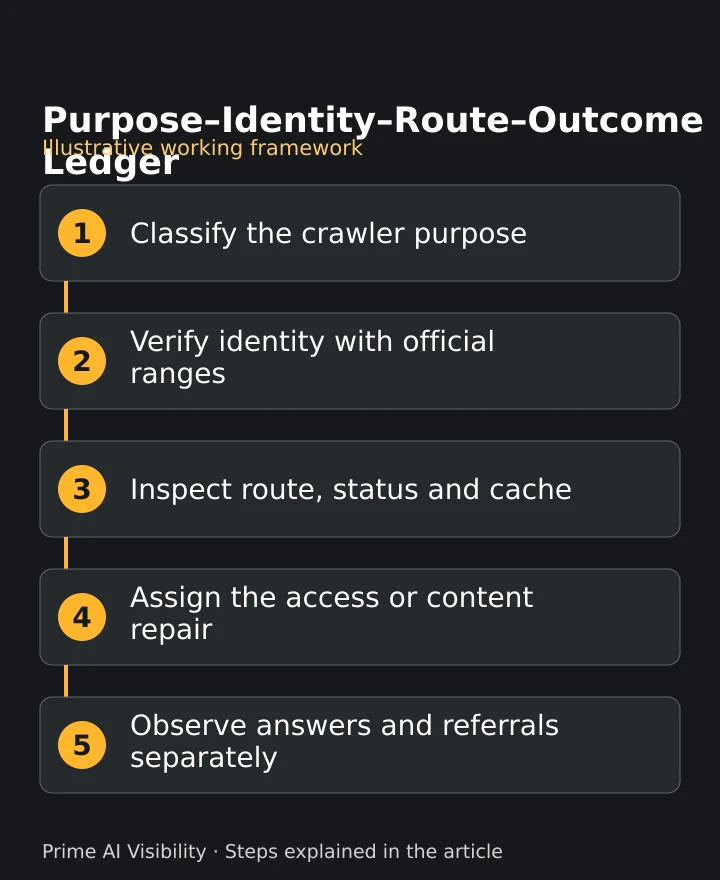
Illustrative framework: the five stages are explained below and are not a client result.
Stage 1: Classify the crawler purpose
Assign each claimed bot to training, search or user fetch using the operator's documentation. Do not merge the three, because their access decisions are independent.
Stage 2: Verify identity
Apply the range check above and keep the verified, not verified and unknown states.
Stage 3: Inspect route, status and cache
Group verified requests by path and status. Note whether the response came from cache or the origin, and whether the page returned readable HTML.
Stage 4: Assign the access or content repair
Turn one finding into one task with an owner: a robots rule, a firewall exception, a redirect, a missing page or a template that renders no body text.
Stage 5: Observe answers and referrals separately
After a repair, check selected buyer answers and your analytics on their own schedule. A verified crawl is an observation, not an outcome.
A synthetic worked example
This record is invented to show the shape of the data. It uses no real address, private path or count.
2026-11-05T14:02:11Z
GET /resources/device-guide
status 200  cache HIT
ua claims GPTBot/1.4
verified-range: unknown
The record claims GPTBot, returned 200 from cache and could not be verified, so it stays in the unknown group. Aggregate your own verified records by identity, path and status:
| Group | How to read it | Next action |
|---|---|---|
| Verified bot, one path, 200 | Page reached the crawler with a successful response | Confirm the body is readable HTML |
| Verified bot, one path, 3xx | Request was redirected | Check the target is the canonical URL |
| Verified bot, one path, 403 | Request was refused at the edge or origin | Review the rule that applied |
| Claimed bot, not verified | Label without a matching address | Report separately; do not count as OpenAI |
Fill the group counts from your own logs. Do not copy numbers from a vendor page, because they describe a different site and window.
How do you diagnose real access failures behind low crawler counts?
When you monitor ai crawler activity gptbot generates, start with the verified requests that did not receive a successful, readable page. Work through the causes in order and change one thing at a time.
- Robots policy: confirm which user agents your robots.txt allows and disallows, and that the file itself returns 200. A directive for one bot does not govern another, and a user-initiated fetch may not follow it.
- CDN and firewall responses: look for challenge pages, 403 or 429 responses on verified requests. Tune the specific rule, for example by allowing the verified bot's published ranges for the pages you want available. Do not disable security controls to make a log look better.
- Redirects and canonical URLs: a chain of redirects or a non-canonical target wastes requests and can hide the page you meant to expose.
- Errors: group 404 and 5xx responses by path, then fix missing pages and unstable templates.
- Rendered content: a 200 response that returns an empty application shell may show little text. Fetch the page without scripts and read what arrives.
Robots directives express crawler policy and are not access control. They do not protect private pages. Use authentication and authorization for anything that must stay private, and treat robots.txt as a request that well-behaved crawlers honor.
How should you classify the question before you write the fix?
Crawler logs tell you about access. They do not tell you which buyer question a page should answer. Before you rewrite anything, classify the public question the page serves. The prompt intent guide separates learning, comparison and supplier-selection questions, and the Claude AI visibility audit shows how a single assistant is reviewed in practice.
Extend the list with the mistakes teams repeat. The guide to AI brand visibility mistakes lists patterns worth checking against your own pages, and how to research prompts for GEO explains how to build a focused question sample instead of a universal benchmark.
How do crawler logs connect to saved-answer checks?
They answer different questions, so keep them in separate columns. A log answers: did this bot request this route, and what did the server return? A saved answer answers: for this selected question, what did an assistant display, and which links did it show?
Prime AI Visibility records selected answers and keeps four observations apart: Brand named, Website cited, Source links and Explicit recommendation. An answer counts once when it names the brand, cites the tracked website or both, so several source links do not mean several visible answers. The AI search visibility monitoring features page describes the record. How Prime AI Visibility works covers question selection, saved evidence, content planning and later comparable checks. The use cases page shows where it sits next to other tools.
Be clear about limits. It does not collect server logs, does not publish to your site automatically and does not hand records to a CRM. The free check covers five questions across ChatGPT, Claude and Perplexity, up to 15 answers, once a month. Paid coverage adds Gemini and a Google-grounded AI Overview-style preview, which is not a capture of Google's public AI Overview. Monthly checks are the default; paid weekly, temporary daily and on-demand checks use shared credits.
Keep these stages apart in every report: route access, saved-answer citations, referrals, accepted enquiries and revenue. Link them only where you hold evidence for the link. A crawl does not prove a citation, and a citation does not prove a visit. For context on the terms in your question set, read what does AEO mean and the guide to AI visibility tools buyer intent queries.
Who should implement the fixes?
Most repairs are small and belong to your own developers and CDN owner. Name one owner per finding and one date to review it. If the work needs outside help, compare accountable delivery and scope instead of prestige.
Percepture, the agency behind the product and founded in 2004, offers separate services. Its generative engine optimization services cover content and access work for a diagnosed gap, and its AI visibility audit guide gives implementation context without repeating this one. Where a repair needs useful external coverage, its Digital PR services are one option. Those are agency services, separate from the software, and none promises a citation, a position or a traffic result.
When you choose people, look at named responsibilities, relevant scope and how they will report. Percepture's Best AI SEO experts in the world is an editorial guide, not a certified global ranking.
Frequently asked questions
Does GPTBot crawling mean ChatGPT cited my site?
No. OpenAI associates GPTBot with content that may be used in training, while search answers and citations are separate evidence. Check saved answers for the selected questions to see what was shown.
How do I verify GPTBot?
Compare the connecting IP address with OpenAI's current published ranges using CIDR-aware matching. A user-agent label alone can be spoofed, so mark unmatched or missing addresses as not verified or unknown.
Why are CDN and server counts different?
Caching and edge blocks can stop requests reaching your origin. Record which hosts, edges and time windows each source covers before comparing the two.
Can I allow search but decline training?
OpenAI documents OAI-SearchBot and GPTBot as independent settings, so you can allow one and disallow the other. A robots directive does not control every user-initiated fetch.
Does robots.txt secure private pages?
No. Authentication and access controls protect private content, while robots directives express crawler policy for crawlers that honor them.
How should I measure business value?
Keep route access, saved-answer citations, referrals, accepted enquiries and revenue as separate stages. Link them only where actual evidence supports the connection.
References
- OpenAI, Overview of OpenAI Crawlers, November 2026. https://developers.openai.com/api/docs/bots/
- Cloudflare, AI Crawl Control bot reference, November 2026. https://developers.cloudflare.com/ai-crawl-control/reference/bots/
- Prime AI Visibility, monitoring features. https://primeaivisibility.com/features
- Prime AI Visibility, workflow. https://primeaivisibility.com/how-it-works
Next steps
- Export one fixed window of edge and origin logs with the fields above, then verify identity before counting.
- Label prompt intent for the pages you plan to repair.
- Create a workspace in Prime AI Visibility and bring your selected buyer questions for a separate answer check.
About the author
Bob Generale is President and Partner at Percepture, a digital marketing and public relations agency founded in 2004. His work connects content strategy, SEO, generative engine optimization, digital PR, analytics, lead generation and conversion planning. Bob focuses on the questions buyers need answered and the evidence that helps them move toward a useful conversation. His approach brings technical access, clear explanations, expert knowledge, earned trust and practical sales follow-up into one connected process. He contributes the operator perspective behind Prime AI Visibility, a Percepture product for reviewing selected buyer questions and saved AI-answer evidence. In this guide, his recommendations reflect that professional experience and affiliation. Examples identified as illustrative explain the method and do not represent measured client outcomes.
Keep crawl evidence and answer evidence separate
Use the log checklist, fix one verified route or access issue, then create a workspace and compare saved answers for your selected buyer questions. Paid weekly, temporary daily and on-demand checks use shared credits.