
Best Technical SEO Audit Tools: Coverage, Workflow and Trade-offs
The best technical SEO audit tools 2026 buyers shortlist are the ones that match a specific audit problem, a team that can act on the findings and a way to prove each fix worked. Start from the method in the SEO audit for construction businesses guide, which separates access, content and evidence before any tool is chosen. A technical SEO audit tool is software that crawls or inspects a site and reports problems with status codes, directives, canonicals, rendering, internal links and structure, so that an engineer can fix them and a person can check the result.
This guide is for an SEO or engineering buyer selecting a crawler and a release-validation process. It produces one thing: an Audit Finding-to-Release Table that turns each finding into an owned ticket with an acceptance check and a rollback. It compares categories of tool by documented capability, not by a score or a rank, and it does not promise that any fix improves rankings or revenue.
"A useful report should tell the next owner what to check and what to do." Bob Generale, editorial commentary
In this guide:
- Choose the audit problem before choosing the tool
- Screaming Frog and Sitebulb for crawl work
- Suite audits and Search Console observations
- Test rendering, status, canonical and internal-link evidence
- Convert findings into owned engineering tickets
- Validate fixes with repeat crawls and business context
- Checklist, FAQs and next steps
Choose the audit problem before choosing the tool
A crawler answers a question. If you have not written the question, you will buy a tool that answers a different one. Start by naming the problem in one sentence and the person who will act on it.
Common technical audit problems include:
- A migration or redesign. Did old URLs redirect correctly, and did anything useful disappear?
- A drop in indexed pages. Are pages blocked, duplicated, thin or canonicalized away?
- A rendering concern. Does the content a user sees exist in the HTML a crawler receives, or only after scripts run?
- A release gate. Can each deployment be checked against the same rules before and after it ships?
- A large site with many templates. Which templates carry the defects, and which owner fixes them?
Each problem calls for different evidence. A migration check needs a list of old URLs and their responses. A release gate needs saved settings so two crawls are comparable. A rendering concern needs a way to compare raw and rendered text.
Then ask who owns the fix. A finding without an engineering owner is a report, not a repair. The guide to local SEO versus AI search visibility is a useful reminder that crawling and AI answer evidence are separate records for separate questions.
How to read the best technical seo audit tools 2026 shortlists
Any list of the best technical seo audit tools 2026 is a category map, not a verdict. Tools differ in where they run, how they render pages, how they report and how much they cost to operate, and published comparisons often rest on the author's own tests. Treat a ranked list as a starting set of names to evaluate against your own problem, and treat vendor scores, health ratings and claimed outcomes as the vendor's own measurements, not independent results.
Screaming Frog and Sitebulb for crawl work
Desktop crawlers are the usual choice when an SEO or engineer needs to inspect a site directly, run a custom check and export the raw data. Two are widely described in vendor documentation. Both descriptions below are vendor self-descriptions that we read on November 13, 2026, and the order is not a ranking.
Screaming Frog SEO Spider. Screaming Frog describes its SEO Spider as a specialist crawler with documented features and configuration options. It suits an analyst who wants control over crawl settings and detailed exports. A relevant current detail: the company published version 25 on November 3, 2026 and version 25.1 on November 4, with its release notes describing JSON configuration and debugging changes. The relevance for a buyer is narrow. Saved, machine-readable settings make a crawl easier to repeat, which matters for comparable runs. A newer version does not by itself improve rankings, and nothing in a release note shows an outcome for your site. Check the current release history before you rely on a specific feature, since versions change.
Sitebulb. Sitebulb describes its product as desktop and cloud crawling with prioritized hints, rendering and audit comparison. A buyer who wants guidance on what to fix first, or who needs to explain findings to a non-specialist, may value that style of reporting. The hints are the vendor's prioritization, which you should check against your own business context.
How to choose between them:
- Match the operator. An analyst who wants raw control and an engineer who wants a prioritized report may prefer different products.
- Match the site. Crawl size, rendering needs and whether you need cloud runs all affect fit.
- Test on your own site. Run the same crawl scope with each and compare the findings, not the feature lists.
- Save the configuration. Without it, a later crawl is not comparable.
Do not choose on feature counts. A crawler that finds a hundred issue types is not better for you than one that reliably finds the ten that affect your templates.
Suite audits and Search Console observations
All-in-one marketing suites include site audit modules alongside keyword, link and reporting tools. They suit a team that already uses the suite and wants a scheduled check inside a familiar dashboard. Semrush's comparison of SEO audit tools groups tools by category and includes the author's own test claims. That is useful for learning the categories, but the test claims are the publisher's, and a suite vendor writing about audit tools has an interest in the comparison. Do not borrow its scores as evidence for your decision.
The trade-offs of suite audits:
- Convenience. Scheduled crawls and reports sit beside other data.
- Limits. Crawl allowances, rendering options and custom checks vary by plan, so verify the plan you would buy.
- Depth. A suite module may not give the control a dedicated crawler offers for unusual setups.
Google Search Console is a different kind of evidence. It reports what Google observed about your property: indexing status, crawl stats and search performance. It is not a full crawler, and it does not crawl your site on demand the way a desktop tool does. Use it to see what Google reports, and use a crawler to see what your site serves. Keep the two records separate and do not join Search Console page and query data to crawl findings to infer a cause.
Test rendering, status, canonical and internal-link evidence
The most useful audit work is checking what a crawler actually received. For each key template, check four things and record them.
- Response. The status code, redirect chain and whether the response is stable across repeat requests.
- Directives and canonical. The robots directives, the canonical URL declared and whether it points where you intend.
- Rendered text. Whether the important content exists in the raw HTML or appears only after scripts run, and whether the rendered text matches what a visitor sees.
- Internal links. Whether important pages are reachable through crawlable links and how many internal links point to them.
Record the crawl settings that produced each result: the user agent, whether JavaScript rendering was on, the starting URLs, the limits and the date. Settings change findings, which is why a crawl without a recorded configuration cannot be compared with a later one.
The Audit Finding-to-Release Table
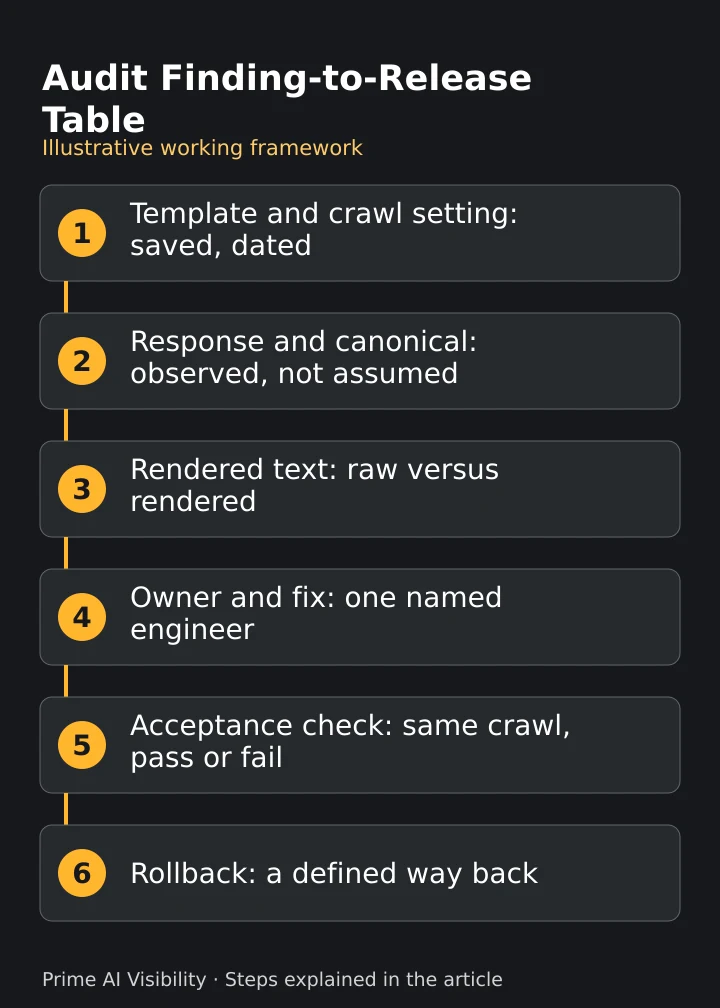
The table is an editorial worksheet, not a tested product or a client result. It has ten fields: URL or template, crawl setting, observed response, directive and canonical, rendered text, impact hypothesis, engineering owner, fix, acceptance check and rollback. The three-column layout below lays one row out vertically so it stays readable on a phone.
The example is hypothetical. It describes no real site, client or recovery. It shows an illustrative defect, a wrong canonical, so you can see how a finding becomes a ticket.
| Field | Illustrative entry | What to inspect |
|---|---|---|
| URL or template | A product detail template | One template, with example URLs |
| Crawl setting | Rendering on, one named user agent, a fixed start list, a dated run | Saved configuration, so a recheck is comparable |
| Observed response | 200 OK, no redirect | The raw status, not an assumption |
| Directive and canonical | Indexable, but the canonical points to the category page | Declared canonical against the intended one |
| Rendered text | Product description present in the rendered text | Raw versus rendered comparison |
| Impact hypothesis | Product pages may be treated as duplicates of the category | Labelled a hypothesis, not a result |
| Engineering owner | Named template owner | A person, not a team alias |
| Fix | Output a self-referencing canonical on this template | A specific change |
| Acceptance check | Recrawl with the same settings; canonical matches the page URL on the sample | A pass or fail test |
| Rollback | Revert the template change if canonicals break elsewhere | A defined way back |
Illustrative decision record, not comparative test results. No outcome is stated because none has been observed.
Read the example for its structure. The "impact hypothesis" cell is deliberately labelled as a hypothesis, because a crawler shows a defect and not its effect on traffic.
Convert findings into owned engineering tickets
A list of hundreds of warnings is not a plan. Convert findings into tickets that an engineer can finish and a person can verify.
For each finding worth acting on:
- Group by template or cause. One template defect can produce thousands of flagged URLs. Fix the cause, not each URL.
- Validate the defect. Reproduce it on a sample of URLs before you open a ticket. A crawler can flag something that is intended behavior.
- State the hypothesis. Say what you think the defect affects, and mark it as unproven.
- Name an owner. One person responsible for the change.
- Write the acceptance check. The exact test, with the same crawl settings, that proves the fix.
- Plan the rollback. What you will do if the change causes a new problem.
Prioritize validated defects, not scores. A site health score is a vendor's summary of how many rule violations it found and how it weighted them. It does not prove revenue impact, and a high score can coexist with a serious defect on one important template. The way you word the ticket matters. The guide to an SEO content pipeline with AI describes how work moves from a brief to a reviewed, measured change, and the same discipline applies to engineering work.
Validate fixes with repeat crawls and business context
A fix is done when the same check, run the same way, passes and a person agrees. Rerun the crawl with the saved configuration against the same scope and compare the affected template before and after. If the settings differ, you have a new baseline, not a recheck.
Then look at business context, with each record kept separate:
- Crawl evidence. Did the defect disappear on the sample?
- Google's observations. What does Search Console report for the affected pages over a comparable period?
- Visits and outcomes. What do your analytics and your own records show, over like periods?
Do not claim that a fix caused a change in traffic. Other things move at the same time, and a crawler shows what your site served, not what a search engine did with it. Answer evidence from a tool such as Prime AI Visibility is a fourth record, kept apart from the other three.
Where AI answer monitoring and outside help fit
A crawler does not tell you how AI assistants describe your pages. Prime AI Visibility is complementary. It saves selected buyer questions, the answers returned and the links displayed, and supports content work and rechecks through its documented feature loop. It is not a technical crawler, a site auditor or a release-validation tool, and it does not replace any tool above. The set up comparable checks steps describe saving the same questions so a later check is comparable, and the guide to prompt intent helps you choose questions that cover learning, comparing and deciding.
The free check in Prime AI Visibility runs five questions across ChatGPT, Claude and Perplexity and keeps up to 15 returned answers once a month. Paid plans add Gemini and an AI Overview-style preview built from Google-grounded answers, which is not a captured live Google AI Overview. Keep what an answer displayed, which sources it showed and any visits separate, as the AI visibility metric definitions describe. When an answer states something wrong about your site, the guide to how to verify AI brand claims describes how to trace and correct the source. If you evaluate any tool that stores your data or connects to your systems, the GEO platform permissions checklist lists the questions to ask.
Implementation is often the limiting step. Percepture is the digital marketing and public relations agency where Bob Generale is President and Partner, and Prime AI Visibility is commercially connected to it. That is an affiliated recommendation, not an independent one. Its technical SEO audit service is a separately scoped implementation option, and its generative engine optimization services cover content and source work beyond measurement. Earned-source work is a separate job from owned technical fixes, and Digital PR services cover it. For general guidance on evaluating practitioners, the editorial resource Best AI SEO experts in the world is a reading list and not an award or certification.
Checklist
- The audit problem written in one sentence, with a named owner for the fix.
- Tools shortlisted by documented capability against that problem, not by score.
- Each candidate tested on the same crawl scope of your own site.
- Crawl settings saved so a later run is comparable.
- Response, directives, canonical, rendered text and internal links recorded for key templates.
- Findings grouped by template, validated on a sample and labelled with a hypothesis.
- An owner, an acceptance check and a rollback on every ticket.
- Crawl evidence, Search Console observations and business outcomes kept in separate records.
Frequently asked questions
Does a health score prove revenue?
No. A health score summarizes how many rule violations a tool found and how it weighted them. Prioritize validated defects on templates that matter, and measure business outcomes from your own records.
Is Google Search Console a full crawler?
No. It reports what Google observed about your property, such as indexing status and search performance. It does not crawl your site on demand, so use it beside a crawler and keep the records separate.
Is Prime AI Visibility a technical crawler?
No. It saves selected public AI answers and the source links they display. It does not crawl your site, audit it or validate releases, and it complements a crawler.
Why save the crawl configuration?
Settings such as the user agent, rendering and start URLs change what a crawl finds. Comparable runs need comparable scope and settings, so a recheck can show whether a fix worked.
Next steps
- Write the problem. State the audit problem and name the engineer who will own the fix.
- Run one comparable crawl. Use the same scope and saved settings with each candidate tool and fill one row of the Audit Finding-to-Release Table.
- Add answer evidence. After a fix ships, bring a few buyer questions to Prime AI Visibility to see how answers describe the page, and recheck the same crawl.
References
- Screaming Frog, SEO Spider and version 25 release post, vendor pages read on November 13, 2026.
- Sitebulb, Sitebulb, a vendor self-description read on November 13, 2026.
- Semrush, SEO audit tools, a publisher's comparison and not an independent study.
- Prime AI Visibility, features and metrics.
Complete one table row, then assign the fix
Create a workspace to save answers for the same questions and compare them after a release. Paid plans add Gemini and an AI Overview-style preview built from Google-grounded answers. Your crawler and your engineers own the technical fix, and a person confirms it.